Hidden Hinges Made Easy
Summary
This is an alternative to the usual "V" shaped control surface leading edge. I'm designing my company's first airplane ([link=http://www.rcuniverse.com/forum/m_4588489/mpage_1/key_/tm.htm]Modkat Build Thread: CLICK HERE[/link]) and wanted my hinges to be a little more sophisticated so I developed this easy alternative . I know that scale builders use a similar technique, but I haven't come upon a theard on how to do it so I thought to add one myself. With a little attention to detail, this can be accomplished rather easily and with minimal effort.
Construction
1. Sand the trailing edge of the wing completely flat with a sanding block or razor plane (figure 1).
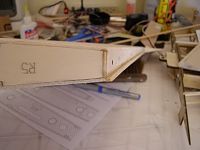 Figure 1
2. Shape the control surface leading edge to a circular shape. Here I used CAD generated templates for guides, but this could be accomplished without them (figure 2).
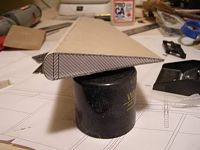 Figure 2
3. Select balsa stringers the same thickness as your wing sheeting and mark, then bevel, approximately 45 degrees away from the edge (figure 3).
 Figure 3
4. Attach the stringers to the trailing edge and flush with the wing sheeting. Then, test fit the control surface to the wing and check for binding (figure 4). Here is my set up for the Modkat and the CAD generated plans that I used for a reference (figure 5) [sm=shades_smile.gif].
Mods
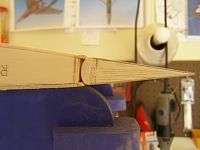
 Figures 4 & 5