Originally Posted by
gooseF22
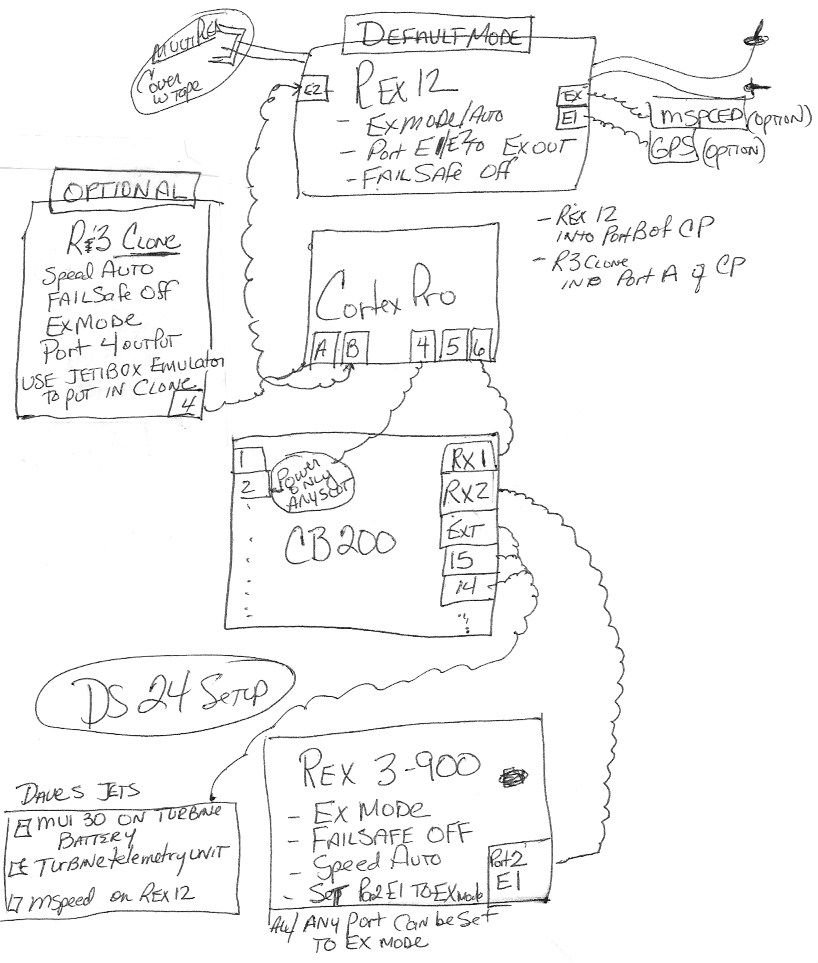
Here you go Ya'll. here is stick diagram that describes a way, not the only way, but one idea on how to hook up a Default/Clone, Cortex Pro, and CB200 setup.. typical of Jeti on a Jet..
This is my preference, however I could easily do away with the R3 here.. I could also be talked into putting the 900 into the Cortex Pro.. there are pros and cons for both.. If you are going to run 2 x 2.4's however Danny and I still recommend first flight or two at a quiet field and in Dual path to help with antenna placements, then switch it to Default clone..
If you need help doing that, Please read back.. there are instructions in the DS16 thread on how to do that.. IT takes some practice to get it.. I have one jet still in Dual path because.... guess.... IT WORKS.. I have another in Default.. IT works too.. I have one plane with an R14 as a the driver, and an R5i as a backup in PPM.. it works.. I have a Rex9, with a R5 backup in PPM, and it doubles as channel 10 for gain.. we have one plane that uses 2 serial inputs to the Cortex Pro, and now it can use that and drive 6 servos directly.. so we end up with 2 receivers and a CP and a DS10 wireless power switch and one of the receivers driving throttle..etc.. Lots of ways to do this.
If you get out there and use a mode you dont understand, you will have a hard time troubleshooting it if there is a setup issue.. Usually the most simple is the best.. In that case, it would be a Primary receiver in Default, and a 900 if you have a 24.. and if you have a DS16, then a default and a clone.
Point is, there is alot of combinations.. so educate yourself on how it works, and choose your path depending on your comfort and conditions...
I heard a good argument today for putting the 900 in the cortex pro port A, and the Rex 12 in B.. CP port 5 in the CB200 RX2 port.. it works too..
They all work.. Its difficult to prove which one works better..
My last point is check your connections.. I opened up a plane yesterday and found a power wire disconnected from the receiver.. it had redundant wiring.. thankfully.. who knows how long it was like that.
good luck out there.
Goose,
As much as I appreciate the information and diagram you provided in this post, please take a step back and try to read it in the context of someone new to Jeti, or worse, considering switching to Jeti. It’s mind boggling, at best. Even many of us who have owned Jeti for a while are just recreational modelers and may program a new jet once a year. It just can’t be this complicated.
Suggestion: Have Jeti decide on a “recommended” setup for the DS-16 and 24 and provide
absolutely clear, step-by-step instructions, on how to accomplish. Something similar to the information provided in the Jeti-Shorts videos at Espirit Models. Offer some configuration “options” but with
absolutely clear instructions on how to accomplish.
Suggesting that people read back through 3,459 posts on a related thread (DS-16) is not realistic.
I’ll admit, I may be slower than the average modeler but a lot of this programming and setup is simply not intuitive. Who knew that the REX12 does not use EXT to connect to the CB (like other rx’s) or that a JetiBox is required to select Clone mode? These are examples from just an evening of frustration trying to replace an R3 with a REX12.
I hope I’m not coming off just as a “complainer” because I really like my Jeti and plan to upgrade to the DS24 soon. I just wish the setup was more straight forward and less difficult. You are one of the most informative and helpful reps on RCU so maybe you can help with a solution for us simpletons.
Thanks,
Craig