i was having trouble with resetting my password on here, so have not been able to login successfully until now..
Anyway in regards to the Anchorman feature that Brenner is having trouble with.... I have not played with this feature too much but for me it works fine and was able to export a file, modify it and then load it back in without issue.
First up is that you should be using the 'Load List' and 'Export List' functions within the Anchorman menu to import/export (ie copy across) the text file to and from either the internal SD card memory or a USB stick. Do not simply try and drag/copy and drop from the USB stick to the relevant folder.
The file is just a very basic text file so do not open it using MS Word etc, just use a basic text file editor such as Wordpad or Notepad if working in a Windows environment.
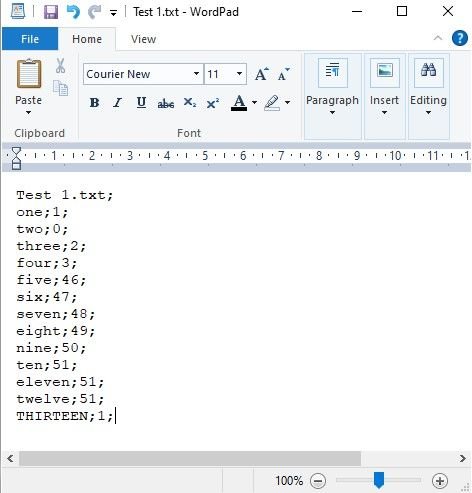
At the very bottom of this post is a screen shot of a before and after of my modified text file - I originally made up a list of 12 entries then exported the file (Don't forget to press save first near the bottom of the list) and added a 13th entry on my PC. I then loaded the modified text file back into the Anchorman menu using the 'Load List' feature.
Works 100% ok...


Remember to hit Save so your list is saved to the actual text file you have selected in the top LH corner of the Anchorman menu feature. This file resides on the SD card inside the Tx - obviously you can store mutiple files.
There is a small bug at the moment which PB are aware of in that if you create a file here, you can not delete at this stage. You can modify any existing file but not delete it - should be fixed in the next firmware release.
Once your list is saved to the internal SD card you can simply select it in the Anchorman menu and then 'Export' it to you USB stick just by pressing Export List... No different to exporting a typical model.
When wanting to load a modified Anchorman list... just use the 'Import List' feature and navigate to your USB stick... You should be able to see any Anchorman text files that are on your USB stick.
Below is the file I edited and added the 13th list entry... Test 1.txt
Select the file then hit the green tick symbol and it will import this file to the Anchorman list of files stored in the Tx.

Sample of my before and after (edited) Test 1.txt files.
Format is pretty simple - Text entry then a number which correlates to the voice selected for announcemet, note the semicolon delimiters required.