Go Back  RCU Forums > RC Universe Support > Forum questions or problems
Cannot collapse FPV forums! >

Cannot collapse FPV forums!

Community
Search
Notices
Forum questions or problems Post any questions about how to use the forum or any bugs/problems you may be having in this forum.

Cannot collapse FPV forums!

Thread Tools
 
Search this Thread
 
Old 12-27-2019 | 06:04 AM
  #1  
1QwkSport2.5r's Avatar
Thread Starter
 
Joined: Oct 2006
Posts: 10,530
Received 105 Likes on 93 Posts
From: Cottage Grove, MN
Default Cannot collapse FPV forums!

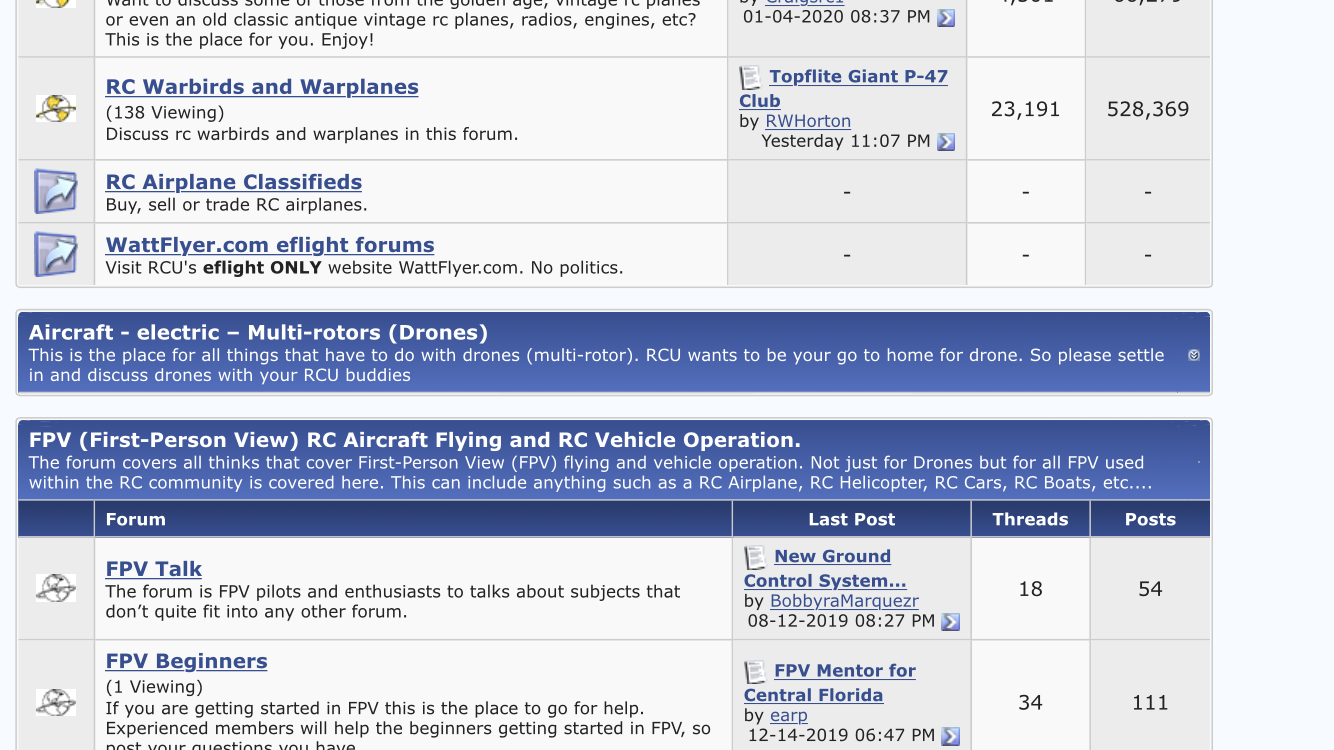
I collapse the forum sections I don’t read; the only forum that doesn’t have a collapse button is the FPV forum section. I’d like to be able to collapse this. What needs to be done?
Old 12-27-2019 | 10:56 AM
  #2  
 
Joined: Sep 2015
Posts: 543
Received 12 Likes on 10 Posts
Default

Originally Posted by 1QwkSport2.5r
I collapse the forum sections I don’t read; the only forum that doesn’t have a collapse button is the FPV forum section. I’d like to be able to collapse this. What needs to be done?
Do you have cookies enabled for RCU?
Old 12-27-2019 | 01:21 PM
  #3  
1QwkSport2.5r's Avatar
Thread Starter
 
Joined: Oct 2006
Posts: 10,530
Received 105 Likes on 93 Posts
From: Cottage Grove, MN
Default

Originally Posted by IBJoel
Do you have cookies enabled for RCU?
Yes, of course I do. All of the other forums collapse and stay collapsed. Every other forum has a collapse button - EXCEPT the FPV forum.
Old 12-30-2019 | 12:52 PM
  #4  
 
Joined: Sep 2015
Posts: 543
Received 12 Likes on 10 Posts
Default

Originally Posted by 1QwkSport2.5r
Yes, of course I do. All of the other forums collapse and stay collapsed. Every other forum has a collapse button - EXCEPT the FPV forum.
Oh, the FPV doesn't even have the button? If that's the case, try bypassing your cache: https://en.wikipedia.org/wiki/Wikipe...ass_your_cache
Old 01-04-2020 | 08:19 AM
  #5  
1QwkSport2.5r's Avatar
Thread Starter
 
Joined: Oct 2006
Posts: 10,530
Received 105 Likes on 93 Posts
From: Cottage Grove, MN
Default

That doesn’t work on iPhone. I deleted all website data and cache, signed back in, still the same problem. FPV is the only forum that doesn’t have a collapse button. It’s been like this for several months; I just didn’t bother reporting it.

Last edited by 1QwkSport2.5r; 01-04-2020 at 12:37 PM.
Old 01-06-2020 | 12:30 PM
  #6  
 
Joined: Sep 2015
Posts: 543
Received 12 Likes on 10 Posts
Default

Originally Posted by 1QwkSport2.5r
That doesn’t work on iPhone. I deleted all website data and cache, signed back in, still the same problem. FPV is the only forum that doesn’t have a collapse button. It’s been like this for several months; I just didn’t bother reporting it.
I just noticed that you mentioned the button doesn't appear at all. Can you post a screenshot of that, please? I'd like tech to take a look.
Old 01-06-2020 | 11:42 PM
  #7  
1QwkSport2.5r's Avatar
Thread Starter
 
Joined: Oct 2006
Posts: 10,530
Received 105 Likes on 93 Posts
From: Cottage Grove, MN
Default


There ya go. One zoomed shot and one full screen. I included part of the collapsed banner of the forum above.
Old 01-07-2020 | 09:29 AM
  #8  
 
Joined: Sep 2015
Posts: 543
Received 12 Likes on 10 Posts
Default

Thank you very much. I was also able to replicate this on my phone and I'll ask tech to take a look. I was able to zoom in on that section heading where the button should be and I did see a tiny version of it that was clickable. So that should work until tech fixes it.
Old 01-07-2020 | 03:04 PM
  #9  
1QwkSport2.5r's Avatar
Thread Starter
 
Joined: Oct 2006
Posts: 10,530
Received 105 Likes on 93 Posts
From: Cottage Grove, MN
Default

Originally Posted by IBJoel
Thank you very much. I was also able to replicate this on my phone and I'll ask tech to take a look. I was able to zoom in on that section heading where the button should be and I did see a tiny version of it that was clickable. So that should work until tech fixes it.
Without zooming ALL the way in, nobody would ever see that. I was able to zoom in and see it and the button did in fact work. But a more visible button would certainly be nice.

Thanks for looking into it and getting it fixed.

Posting Rules
You may not post new threads
You may not post replies
You may not post attachments
You may not edit your posts

BB code is On
Smilies are On
[IMG] code is On
HTML code is Off
Trackbacks are Off
Pingbacks are Off
Refbacks are On


Contact Us - Archive - Advertising - Cookie Policy - Privacy Statement - Terms of Service

Copyright © 2026 MH Sub I, LLC dba Internet Brands. All rights reserved. Use of this site indicates your consent to the Terms of Use.