


Powerbox BlueCom adapter
 07-09-2015 | 03:12 AM
#1
Thread Starter

 Powerbox BlueCom adapter
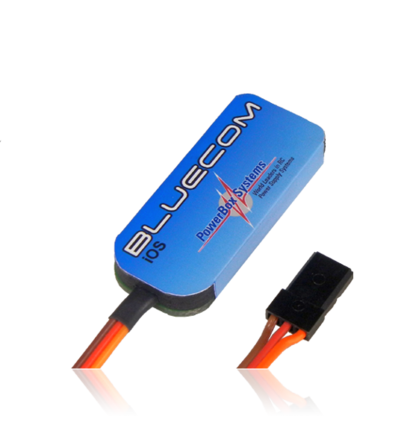
The BlueCom™ adapter provides a means of setting up PowerBox products wirelessly, and of updating the software to the latest version. To use the adapter all you have to do is simply and conveniently download the corresponding App for your Mobilphone or tablet from Google Play, the Apple Appstore or the Windows Store - at no charge! Once you have installed the App on your mobile telephone or tablet, you can plug the BlueCom™ adapter into a PowerBox device. You are then in a position to load the latest update or alter settings. For example, the BlueCom™ adapter enables you to adjust all the various settings available on the iGyro3e* and iGyro1e*conveniently from your mobile phone.
http://www.powerbox-systems.com/en/products/accessories/weitere/usb-interface-adapter.html
http://www.powerbox-systems.com/en/products/accessories/weitere/usb-interface-adapter.html

 07-15-2015 | 03:29 PM
#6
Joined: Mar 2003
Posts: 164
Likes: 0
Received 0 Likes
on
0 Posts
From: Queensland, AUSTRALIA
 07-15-2015 | 05:17 PM
#9
Got mine From Morse Aircraft Development while at Kentucky Jets. Check them out on the web -- Jordan can sell you one and help with the setup and programing. Great product and great support.
07-16-2015 | 04:49 PM
#10


My Feedback: (67)
David I have one of these and a few of the igyro srs w/gps. It looks like it can only provide version updates currently for the srs and not the programming features that it can for the 3e. Correct? Do you know when this ability will come to the srs? I assume it's a App update.
07-16-2015 | 11:59 PM
#11
Thread Starter
PB say that since its menu driven in the screen of the gyro, the SRS was not the priority. The 3e and 1e need this device and updating a PB device is easy-you still set up the PB's in the unit too.
He has said it will get done in an app, but no time frame yet.
Dave
He has said it will get done in an app, but no time frame yet.
Dave
07-30-2015 | 10:36 AM
#12
My Feedback: (16)
I am having trouble getting this to work with my 1e, it finds it and i can update it but i cannot connect to it like i can with the 3e. Any ideas I'm trying to set the 1e so one side is rate/hold and other side off, so i can try it on nose wheel and operate rate switch with gear switch so it doesn't move servo with gear up.
08-21-2015 | 02:46 PM
#13
My Feedback: (1)
Joined: Sep 2003
Posts: 101
Likes: 0
Received 0 Likes
on
0 Posts
From: sturgeon county,
AB, CANADA
Hi,I see your BlueCom works with your 3e,I cant get mine to connect, I have the ios app on my iphone ,have the latest updates,selected igyro3e on the home page of app,powered up in gyro,selected QuickConnect on app and get a msg"no device connected" what am I doing wrong ?
Thanks in advance, Allen
Thanks in advance, Allen
08-21-2015 | 03:01 PM
#14
Joined: Mar 2003
Posts: 164
Likes: 0
Received 0 Likes
on
0 Posts
From: Queensland, AUSTRALIA
Hi,I see your BlueCom works with your 3e,I cant get mine to connect, I have the ios app on my iphone ,have the latest updates,selected igyro3e on the home page of app,powered up in gyro,selected QuickConnect on app and get a msg"no device connected" what am I doing wrong ?
Thanks in advance, Allen
Thanks in advance, Allen
08-31-2015 | 10:26 AM
#18
Thread Starter
Not yet! Its only good for updating the PB units at this time. The original thought for it was the gyro tweaking on the field. They are writing more and more features and it will be possible to do everything you can do on the computer. More info after Jetpower
Dave
Dave
The following users liked this post:
sailr (05-13-2024)
05-13-2024 | 11:04 AM
#20
I don’t think it’s supported any more. At least in the US. Had same issue when I went to use one after some time. Luckily I didn’t delete the app, but then I had to get a new phone and no more.
be nice to have it.
be nice to have it.
The following users liked this post:
sailr (05-13-2024)
05-13-2024 | 11:11 AM
#21


My Feedback: (11)
They have a hand held unit now
https://www.powerbox-americas.com/pr...4f27db96&_ss=r
05-13-2024 | 12:34 PM
#22
Senior Member
My Feedback: (25)
Thanks for the info. I bought three of the Mico Match units from Chief Aircraft because it said they could be programmed from an app on our phones. Grrrrr.
They were having issues with the security changes every time Apple or Andriod did an update it would break it so they quit supporting the app.
They have a hand held unit now
https://www.powerbox-americas.com/pr...4f27db96&_ss=r
They have a hand held unit now
https://www.powerbox-americas.com/pr...4f27db96&_ss=r
Last edited by sailr; 05-13-2024 at 12:36 PM.


