


Clark TK22 sounds help
 11-03-2014 | 05:30 PM
#1

Thread Starter

Joined: Jan 2009
Posts: 1,567
Likes: 0
Received 0 Likes
on
0 Posts
From: King,
NC
 Clark TK22 sounds help
I came to the conclusion a long time ago that I am not an electronic guru. With that being said, I am having problems with the sounds in one of the Hetzers. It makes the sound when either of the control sticks are moved, with or without the engine sounds being turned on. What have I done wrong?
Herman
Herman
 11-04-2014 | 07:45 AM
#4

I can confirm this, I can run my tank without turning on the engine sound (the sounds for turret traverse, elevation and firing still come on). Personally I refer to this as "stealth-mode"  .
.
.
11-04-2014 | 05:05 PM
#5


Joined: Aug 2011
Posts: 1,063
Likes: 0
Received 0 Likes
on
0 Posts
From: Cambridge ON, CANADA
I came to the conclusion a long time ago that I am not an electronic guru. With that being said, I am having problems with the sounds in one of the Hetzers. It makes the sound when either of the control sticks are moved, with or without the engine sounds being turned on. What have I done wrong?
Herman
Herman

 11-06-2014 | 12:13 PM
#9
Member
Joined: Mar 2013
Posts: 91
Likes: 0
Received 0 Likes
on
0 Posts
From: Roswell, GA
11-11-2014 | 08:55 PM
#10
Thread Starter
Joined: Jan 2009
Posts: 1,567
Likes: 0
Received 0 Likes
on
0 Posts
From: King,
NC
Gentlemen, the problem has been resolved. It was the turret rotation sound being played because the trim was not completely centered. Now I need help with a Clark TK22 board not taking input setting changes. The other boards did, but this one will not. Everything was done the same, but it will not change any settings.
Herman
Herman
 11-12-2014 | 04:29 AM
#12
Thread Starter
Joined: Jan 2009
Posts: 1,567
Likes: 0
Received 0 Likes
on
0 Posts
From: King,
NC
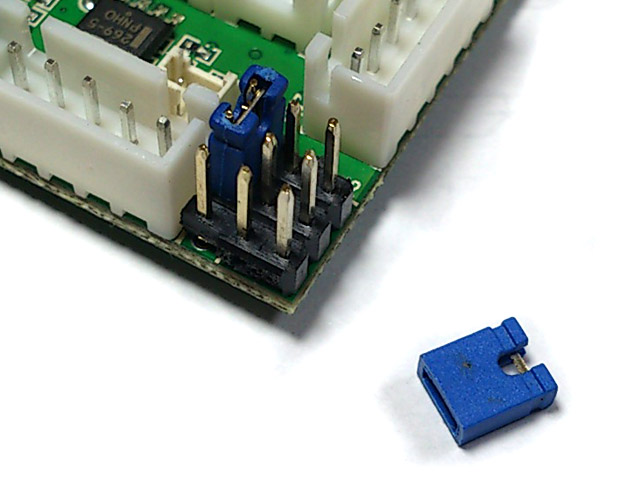
Yes the plug was installed. This is not the same board that the sounds gave me trouble with by the way. This is a different one. I have read and followed the instructions in the Clark manual, but I am not getting anywhere with this board. For example if I push the AB button on the remote it is supposed to change the tank class from heavy to light or whatever is desired. This board only gives me 7 flashes and will not change up or down with further button pushing. It just stays there. Is there a remedial instruction class anywhere that I can attend?
Herman
Herman
Last edited by Green Amphibian; 11-12-2014 at 04:35 AM.
11-12-2014 | 08:24 AM
#13

Yes the plug was installed. This is not the same board that the sounds gave me trouble with by the way. This is a different one. I have read and followed the instructions in the Clark manual, but I am not getting anywhere with this board. For example if I push the AB button on the remote it is supposed to change the tank class from heavy to light or whatever is desired. This board only gives me 7 flashes and will not change up or down with further button pushing. It just stays there. Is there a remedial instruction class anywhere that I can attend?
Herman
Herman
Do you fit the jumper before power board on or after?
11-12-2014 | 09:52 AM
#14
Thread Starter
Joined: Jan 2009
Posts: 1,567
Likes: 0
Received 0 Likes
on
0 Posts
From: King,
NC
I put the jumper on before I powered up the board. This board will not let me change any of the settings. The lights on the TBU flash when I press a button on the remote, but none of the settings will change.
Herman
Herman
Last edited by Green Amphibian; 11-12-2014 at 10:04 AM.
11-13-2014 | 10:31 AM
#17
Member
Joined: Mar 2013
Posts: 91
Likes: 0
Received 0 Likes
on
0 Posts
From: Roswell, GA
I witnessed this. Multiple jumpers were used and they were all placed correctly. Very strange. Also if you tried to save the settings the board did not acknowledge the request (1 or 2).
11-14-2014 | 05:23 PM
#19
Thread Starter
Joined: Jan 2009
Posts: 1,567
Likes: 0
Received 0 Likes
on
0 Posts
From: King,
NC
Curtis, it will not return to factory settings. I have been in contact with Clark and they told me to return it to where I purchased it for evaluation. It was mailed to you today with copies of Clark's emails in the box. The other two were easy to program by following the instructions, this one isn't.
Herman
Herman
Last edited by Green Amphibian; 11-14-2014 at 05:25 PM.


