


Jeti DS-24 Programming Question
 08-27-2022 | 04:50 PM
#1


 Jeti DS-24 Programming Question
Looking for advice on how to program my Jeti DS-24 to control a Unilight 8-light programmable lighting controller.
I have 4 separate light functions; Beacon/ Navigation/ Formation & Landing lights, and I want to use 3 separate switches; 2 2-position and 1 3-position switch. The logic table below shows the required combinations and subsequent channel output.
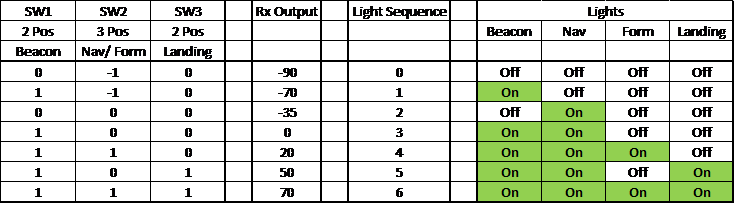
I've thought of using Flight Modes, but I already run 3 of those controlled by my 3-position flap switch. Not sure how to add more, independent flight modes on top of those.
Advice appreciated.
Paul
I have 4 separate light functions; Beacon/ Navigation/ Formation & Landing lights, and I want to use 3 separate switches; 2 2-position and 1 3-position switch. The logic table below shows the required combinations and subsequent channel output.
I've thought of using Flight Modes, but I already run 3 of those controlled by my 3-position flap switch. Not sure how to add more, independent flight modes on top of those.
Advice appreciated.
Paul
 08-27-2022 | 08:27 PM
#2

Don't know if it would simplify things for you or not, but I control my landing lights with either the retracts or the flaps. Depending on the plane. Usually the flaps. Then use a single 3 position as kind of the master switch. Off / nav + strobe / landing. When I get ready to take off I just put the switch in the 3rd position, and it stays activated the entire flight until the taxi back when I can turn the landing lights off by going to 1st or 2nd position.
Just a thought
Just a thought
The following users liked this post:
gooseF22 (09-05-2022)
The following users liked this post:
gooseF22 (09-05-2022)
The following users liked this post:
gooseF22 (09-05-2022)
The following users liked this post:
gooseF22 (09-05-2022)
09-05-2022 | 04:28 AM
#7

When I set up lights initially, I usually just put them on the slider on the back of the transmitter.. then open the throws up to 90%.. this lets me select any mode quickly and see where the PWM output is for the ones I want, and also to quickly turn it off when it blinds you on final once in awhile.. I found that I need to be able to shut them off in flight from time to time over the years of using lights.. so I went to that method as a backup.. Then use other functions to get cool effects. fwiw..goose..


