


Do I have a bad cell?
 05-02-2015 | 03:53 PM
#1


 Do I have a bad cell?
Jens and others,
My Bat 60 is showing a error message in the battery manager about one of the cells. The voltage seems fine. The capacity is lower than normal (not sure I can trust the capacity numbers, as I have not use the transmitter much).
I'm getting the exclamation character in the display, and error sound, and the on/off button colors are blinking red, so the transmitter is signaling something is wrong. I just got this in December (direct from Germany), so its somewhat disappointing if a cell has already gone wrong.
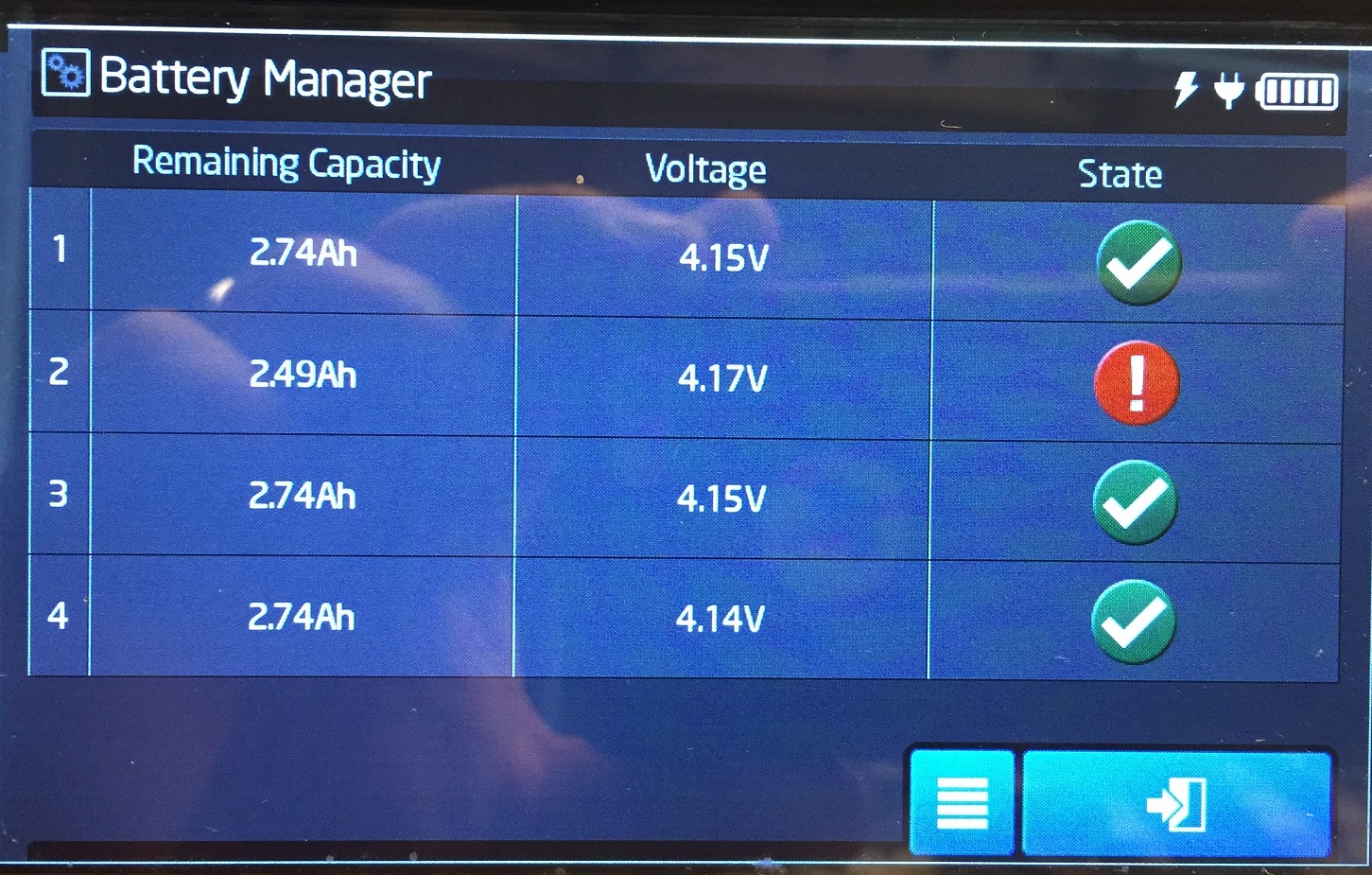
My Bat 60 is showing a error message in the battery manager about one of the cells. The voltage seems fine. The capacity is lower than normal (not sure I can trust the capacity numbers, as I have not use the transmitter much).
I'm getting the exclamation character in the display, and error sound, and the on/off button colors are blinking red, so the transmitter is signaling something is wrong. I just got this in December (direct from Germany), so its somewhat disappointing if a cell has already gone wrong.
 05-04-2015 | 04:04 AM
#2

Junior Member
Joined: Aug 2014
Posts: 26
Likes: 0
Received 0 Likes
on
0 Posts
From: Wildau, near Berlin (Germany)

Hello wea Users,
Hello Edgar,
according to your release from another post I guess you have switch of the Transmitter with empty Battery. At this case the "red !" is ok. Then you have charge the Transmitter. Now you have to switch off the Transmitter and charge it full. Then switch it on again and all 4 green hooks should be there.
Kind regards from Berlin / Mit freundlichen Grüßen aus Berlin
Jens Ackermann
Service Manager / Leiter der Serviceabteilung
Hello Edgar,
according to your release from another post I guess you have switch of the Transmitter with empty Battery. At this case the "red !" is ok. Then you have charge the Transmitter. Now you have to switch off the Transmitter and charge it full. Then switch it on again and all 4 green hooks should be there.
Kind regards from Berlin / Mit freundlichen Grüßen aus Berlin
Jens Ackermann
Service Manager / Leiter der Serviceabteilung
05-04-2015 | 04:44 PM
#3

Jens,
So here is the situation:
1 - turn on the transmitter. Got the error in one of the cells. Notice that the other 3 cells are ok and charged.
2 - turn off the the transmitter.
3 - Attempted to turn it on. the switch does not respond. The Tx is giving the error lights and the alarm sound. Evidently the 3 cells must still have charge, so why I can't turn it on?
4- Nothing I could do, so I left the Tx in that situation overnight. The next morning there was no more sound, as the cells were fully discharged from leaving it in the previous state overnight.
5- Left the Tx charging the full day. After coming from work, I tried turning it on. Guess what? The cell were not charged and the Tx refused to turn on until I connected the power cord. See image below
At this point I'm going to leave it charging overnight again and see what happen.
So here is the situation:
1 - turn on the transmitter. Got the error in one of the cells. Notice that the other 3 cells are ok and charged.
2 - turn off the the transmitter.
3 - Attempted to turn it on. the switch does not respond. The Tx is giving the error lights and the alarm sound. Evidently the 3 cells must still have charge, so why I can't turn it on?
4- Nothing I could do, so I left the Tx in that situation overnight. The next morning there was no more sound, as the cells were fully discharged from leaving it in the previous state overnight.
5- Left the Tx charging the full day. After coming from work, I tried turning it on. Guess what? The cell were not charged and the Tx refused to turn on until I connected the power cord. See image below
At this point I'm going to leave it charging overnight again and see what happen.
05-05-2015 | 03:01 AM
#4
Junior Member
Joined: Aug 2014
Posts: 26
Likes: 0
Received 0 Likes
on
0 Posts
From: Wildau, near Berlin (Germany)
Hello wea Users,
Hello Edgar,
your Transmitter is not charged. Please switch it off. Charge it witch the delivered Charger until the LED Ring is green. Then switch the Transmitter on. take a look (or screen shot) of the Battery Manager.
Kind regards from Berlin / Mit freundlichen Grüßen aus Berlin
Jens Ackermann
Service Manager / Leiter der Serviceabteilung
Hello Edgar,
your Transmitter is not charged. Please switch it off. Charge it witch the delivered Charger until the LED Ring is green. Then switch the Transmitter on. take a look (or screen shot) of the Battery Manager.
Kind regards from Berlin / Mit freundlichen Grüßen aus Berlin
Jens Ackermann
Service Manager / Leiter der Serviceabteilung
05-07-2015 | 06:01 PM
#5
After more than 48 hours connected in the charger, it seems there is a problem with my system.
I loaded a video of the Tx behavior before disconnecting from the charger. You will notice that the red light is blinking, then the system will make a short 'popping' noise (like when you turn it on) and the light will turn off. Shortly after the re light will start again and the cycle repeats.
https://www.youtube.com/watch?v=5eJDWW4dD-4&feature=youtu.be After disconnecting from the charger and turning the system on, the battery manager shows the following:
Note that in the video you don't hear the alarm because I used a switch to turn the volume down.
So what to do now? Don't think I can trust using the Tx this way.
Thanks


