Jeti DS-24


 04-30-2018 | 09:37 AM
#777

I have just ordered a DS-24 and have been using a DS-16 for 3 years. I must second Craig's comments. The Jeti is a great radio with incredible capability. The hours spent trying to figure out how to program these set ups would be better spent in the shop. Jeti should pay to have you experts write up an ancillary manual on how to tackle the most complex issues we deal with in our models related to set up and programming.
Roy
Roy
 $$
04-30-2018 | 02:13 PM
$$
04-30-2018 | 02:13 PM
#778


My Feedback: (14)
I am with Craig. It is the manufacturer's responsibility to characterize how their equipment works best, and if there are multiple choices, they should explain which is best for what purpose. The information we'd need to figure this out is NOT in the manual .. as a "new to Jeti" person I have read it carefully. I have gotten conflicting advice from this forum and from the importer on how to use multiple 2.4GHz RXs, how to connect the 900MHz. I guess they think it's ok for us to all experiment with it. I've also been curious how dual RXs work with the Assist Receivers. Do you need two of them with all the settings identical? That's if you are all-2.4GHz. What about with a 900MHZ backup? Do you fail over to 900MHz and lose the stabilization (that's no so bad .. but is that right?). Silence on that one so far.
Also, this stuff about "fly a few flights at a quiet field and sort out antenna placement" .. oh my. I have been a long-time Futaba user, and say what you want about their lack of innovation (especially on telemetry) but their RF link is rock solid. My idea in getting a Jeti was to get better system capabilities .. and not to move backwards to the Spek/JR nonsense of extra satellites and fade counters (that's what a manufacturer puts in their RF link when it works poorly and has to be tuned by the end user) .. but hopefully to move forward to a solid 2.4 link backed up by the 900 MHz. Very attractive given the proliferation of 2.4GHz signals at some flying sites.
Now I am really getting concerned about putting this Jeti stuff in an expensive jet. I guess many have done it but even the well-experienced folks here on the forum don't seem to really know how things work and why certain configs are preferred. "Well it seems to work for me" is really just not good enough.
Discomforting to say the least. Hoping if I keep listening and learning I can get past this.
Dave
Also, this stuff about "fly a few flights at a quiet field and sort out antenna placement" .. oh my. I have been a long-time Futaba user, and say what you want about their lack of innovation (especially on telemetry) but their RF link is rock solid. My idea in getting a Jeti was to get better system capabilities .. and not to move backwards to the Spek/JR nonsense of extra satellites and fade counters (that's what a manufacturer puts in their RF link when it works poorly and has to be tuned by the end user) .. but hopefully to move forward to a solid 2.4 link backed up by the 900 MHz. Very attractive given the proliferation of 2.4GHz signals at some flying sites.
Now I am really getting concerned about putting this Jeti stuff in an expensive jet. I guess many have done it but even the well-experienced folks here on the forum don't seem to really know how things work and why certain configs are preferred. "Well it seems to work for me" is really just not good enough.
Discomforting to say the least. Hoping if I keep listening and learning I can get past this.
Dave
04-30-2018 | 03:05 PM
#779

No need for concern. Use a single 2.4 RX in Default mode, run the antennas the same as you would with your Futaba, and your Jeti will have the same or better performance. It can be as simple as that. But there are ways to improve on this and Jeti provides the tools/data to do it if you are willing to learn a bit
04-30-2018 | 04:49 PM
#780
No need for concern. Use a single 2.4 RX in Default mode, run the antennas the same as you would with your Futaba, and your Jeti will have the same or better performance. It can be as simple as that. But there are ways to improve on this and Jeti provides the tools/data to do it if you are willing to learn a bit
04-30-2018 | 07:44 PM
#782

Warbird asks " may i ask what the Q and A means. i have the 24 . i just got it but haven't dove into it yet . "i'm try to focus my attention on completing my jet before i get into the programming""
Here is how I understand it. There may be some fuzziness in the details, but it's a good way to think about it, well for me atleast!
Q value- This is a value that your tx interprets how "clean" the telemetry signal is. This is a measure of how your receiver is transmitting to your transmitter. It ranges from 0-99 and numbers (I've heard) from 20-50+ are OK. (I will be crucified here, but, oh well)
A value- This IS THE most important number to look at. It ranges from 0-9. This number evaluates how well your receiver is receiving the signal from the TX.
It is not clear how to make them pop up on your home screen, or which value to have an alarm. You would think that these things would show up automatically and they would be something you'd like to turn off instead of on, because, hey isn't how well our tx is talking to our rx REALLY, REALLY what we care about?
It is my understanding that you will lose the Q values at over twice the distance you'd lose your A values.
Again, this is my understanding. It maybe technically wrong in some senses, but it is a good "working" knowledge type of position.
Here is how I understand it. There may be some fuzziness in the details, but it's a good way to think about it, well for me atleast!
Q value- This is a value that your tx interprets how "clean" the telemetry signal is. This is a measure of how your receiver is transmitting to your transmitter. It ranges from 0-99 and numbers (I've heard) from 20-50+ are OK. (I will be crucified here, but, oh well)
A value- This IS THE most important number to look at. It ranges from 0-9. This number evaluates how well your receiver is receiving the signal from the TX.
It is not clear how to make them pop up on your home screen, or which value to have an alarm. You would think that these things would show up automatically and they would be something you'd like to turn off instead of on, because, hey isn't how well our tx is talking to our rx REALLY, REALLY what we care about?
It is my understanding that you will lose the Q values at over twice the distance you'd lose your A values.
Again, this is my understanding. It maybe technically wrong in some senses, but it is a good "working" knowledge type of position.
04-30-2018 | 07:57 PM
#783
CraigG Posts: Goose,
As much as I appreciate the information and diagram you provided in this post, please take a step back and try to read it in the context of someone new to Jeti, or worse, considering switching to Jeti. It’s mind boggling, at best. Even many of us who have owned Jeti for a while are just recreational modelers and may program a new jet once a year. It just can’t be this complicated.
Suggestion: Have Jeti decide on a “recommended” setup for the DS-16 and 24 and provide absolutely clear, step-by-step instructions, on how to accomplish. Something similar to the information provided in the Jeti-Shorts videos at Espirit Models. Offer some configuration “options” but with absolutely clear instructions on how to accomplish.
Suggesting that people read back through 3,459 posts on a related thread (DS-16) is not realistic.
I’ll admit, I may be slower than the average modeler but a lot of this programming and setup is simply not intuitive. Who knew that the REX12 does not use EXT to connect to the CB (like other rx’s) or that a JetiBox is required to select Clone mode? These are examples from just an evening of frustration trying to replace an R3 with a REX12.
I hope I’m not coming off just as a “complainer” because I really like my Jeti and plan to upgrade to the DS24 soon. I just wish the setup was more straight forward and less difficult. You are one of the most informative and helpful reps on RCU so maybe you can help with a solution for us simpletons.
Thanks,
Craig
Craig,
Yes, yes, YES!!
I suggest we start individual threads on the questions we have so they are easily searchable. As a matter of fact, I may just start that trend myself.
If I may try to expand on your sentiment, and even more, try to get at the underlying "uncomfortableness".
We don't like NOT knowing what we are doing when following suggestions put forth by more advanced users. We like to understand the reason why we are making a program change and HOW that programming works and how it changes things.
Although we appreciate the help, we also like to know, WHY we are doing the suggested programming suggestions. Not because we are ungrateful, quite the opposite in fact, we are just the kind of people who like to LEARN WHY we are doing it.
For example, with my flap slowing programming help, I have no idea why I'm choosing LogMAX???!!! It makes NO sense to me!! It makes me FEEL like I'm trusting on some type of "magic" which makes my 1 neuron, somewhat uncomfortable? Does that make sense?
All that said, Apple doesn't include an owners manual with ANY product, and I've got more Apple products than I've got, well almost anything! I know Jeti is not on the same INTUITIVE level as Apple, and well, some of us don't mind the added thought process behind the routine. That's all.
We would appreciate, and would learn much more, with a little more thought process behind the routine!
Thanks guys!
As much as I appreciate the information and diagram you provided in this post, please take a step back and try to read it in the context of someone new to Jeti, or worse, considering switching to Jeti. It’s mind boggling, at best. Even many of us who have owned Jeti for a while are just recreational modelers and may program a new jet once a year. It just can’t be this complicated.
Suggestion: Have Jeti decide on a “recommended” setup for the DS-16 and 24 and provide absolutely clear, step-by-step instructions, on how to accomplish. Something similar to the information provided in the Jeti-Shorts videos at Espirit Models. Offer some configuration “options” but with absolutely clear instructions on how to accomplish.
Suggesting that people read back through 3,459 posts on a related thread (DS-16) is not realistic.
I’ll admit, I may be slower than the average modeler but a lot of this programming and setup is simply not intuitive. Who knew that the REX12 does not use EXT to connect to the CB (like other rx’s) or that a JetiBox is required to select Clone mode? These are examples from just an evening of frustration trying to replace an R3 with a REX12.
I hope I’m not coming off just as a “complainer” because I really like my Jeti and plan to upgrade to the DS24 soon. I just wish the setup was more straight forward and less difficult. You are one of the most informative and helpful reps on RCU so maybe you can help with a solution for us simpletons.
Thanks,
Craig
Craig,
Yes, yes, YES!!
I suggest we start individual threads on the questions we have so they are easily searchable. As a matter of fact, I may just start that trend myself.
If I may try to expand on your sentiment, and even more, try to get at the underlying "uncomfortableness".
We don't like NOT knowing what we are doing when following suggestions put forth by more advanced users. We like to understand the reason why we are making a program change and HOW that programming works and how it changes things.
Although we appreciate the help, we also like to know, WHY we are doing the suggested programming suggestions. Not because we are ungrateful, quite the opposite in fact, we are just the kind of people who like to LEARN WHY we are doing it.
For example, with my flap slowing programming help, I have no idea why I'm choosing LogMAX???!!! It makes NO sense to me!! It makes me FEEL like I'm trusting on some type of "magic" which makes my 1 neuron, somewhat uncomfortable? Does that make sense?
All that said, Apple doesn't include an owners manual with ANY product, and I've got more Apple products than I've got, well almost anything! I know Jeti is not on the same INTUITIVE level as Apple, and well, some of us don't mind the added thought process behind the routine. That's all.
We would appreciate, and would learn much more, with a little more thought process behind the routine!
Thanks guys!
04-30-2018 | 08:32 PM
#784

My Feedback: (9)
 then I take a spare R3 and program it to be a switch....I control, all my CB200/400 with the R3
How much draw the R3 place on batteries in “off” state? If I were at a weekend event, would I be advised to disconnect batteries if using R3 as a switch?
Thanks
04-30-2018 | 09:44 PM
#785

TX firmware 4.27 recommends REX1.10 for R900, same family as other REX receivers
David
05-01-2018 | 02:55 AM
#786

My Feedback: (53)
It does draw very little, but personally I always build my plane so I have a way to disconnect my batteries, when I’m not flying like overnight, during the day she stay connected.
05-01-2018 | 03:50 AM
#788

My Feedback: (13)
Warbird asks " may i ask what the Q and A means. i have the 24 . i just got it but haven't dove into it yet . "i'm try to focus my attention on completing my jet before i get into the programming""
Here is how I understand it. There may be some fuzziness in the details, but it's a good way to think about it, well for me atleast!
Q value- This is a value that your tx interprets how "clean" the telemetry signal is. This is a measure of how your receiver is transmitting to your transmitter. It ranges from 0-99 and numbers (I've heard) from 20-50+ are OK. (I will be crucified here, but, oh well)
A value- This IS THE most important number to look at. It ranges from 0-9. This number evaluates how well your receiver is receiving the signal from the TX.
Here is how I understand it. There may be some fuzziness in the details, but it's a good way to think about it, well for me atleast!
Q value- This is a value that your tx interprets how "clean" the telemetry signal is. This is a measure of how your receiver is transmitting to your transmitter. It ranges from 0-99 and numbers (I've heard) from 20-50+ are OK. (I will be crucified here, but, oh well)
A value- This IS THE most important number to look at. It ranges from 0-9. This number evaluates how well your receiver is receiving the signal from the TX.
A = Strength of the signal received by the Rx. Kind of like a "volume" of a TV.
Q = The quality of the data received by the Rx. The number of GOOD data frames received, divided over the TOTAL number of frames, resulting in a percentage of GOOD received.
As such, Q values are the most critical as it was ultimately the Rx needs (good data).
We do need to be aware that we only "see" the data as transmitted by the Rx back to the Tx. That links is not as robust, so we may lose some information.
Last edited by Edgar Perez; 05-01-2018 at 03:54 AM.
05-01-2018 | 04:05 AM
#789

I understood somewhat different:
A = Strength of the signal received by the Rx. Kind of like a "volume" of a TV.
Q = The quality of the data received by the Rx. The number of GOOD data frames received, divided over the TOTAL number of frames, resulting in a percentage of GOOD received.
As such, Q values are the most critical as it was ultimately the Rx needs (good data).
We do need to be aware that we only "see" the data as transmitted by the Rx back to the Tx. That links is not as robust, so we may lose some information.
A = Strength of the signal received by the Rx. Kind of like a "volume" of a TV.
Q = The quality of the data received by the Rx. The number of GOOD data frames received, divided over the TOTAL number of frames, resulting in a percentage of GOOD received.
As such, Q values are the most critical as it was ultimately the Rx needs (good data).
We do need to be aware that we only "see" the data as transmitted by the Rx back to the Tx. That links is not as robust, so we may lose some information.
05-01-2018 | 07:06 AM
#790
What makes the Jeti complicated is the continuous BiDirectional comm, mixed with frequency hopping, mixed with control and data. and 2 transmitters doing it at almost the same time...so it actually has to deconflict it ownself too from TX1 and TX2.. It has to prioritize control data always. and sensor update rates vary.. its quite amazing actually whats going on inside. It just works..
We optimize our setups for the over and above average odds of success.. thats what alot of this is about. But the system just works well with a single receiver in default. I have a bunch of planes like that and never have an issue. they just work..
So to keep it simple, Q is important.. It needs packets to operate, no matter what the signal strength is..
- If you got zapped with a microwave with 9's It might stay 9 but he noise floor drops your Q.. On the other hand, I have seen 3/4 antennas, with 100% Q.. thats something to look at if it continues, its time to adjust your antenna location
Bottom line is its a dynamic environment, so things change quickly, and one situation usually only lasts for seconds or less. Try not to get wrapped up in the numbers too much. I set my transmitter for a warning with A1/2 at 3, and Q at 30% in most models.. If I have one thats problematic, I will drop it to 2 and 20%.. thats really it..
simple explanation
We optimize our setups for the over and above average odds of success.. thats what alot of this is about. But the system just works well with a single receiver in default. I have a bunch of planes like that and never have an issue. they just work..
So to keep it simple, Q is important.. It needs packets to operate, no matter what the signal strength is..
- If you got zapped with a microwave with 9's It might stay 9 but he noise floor drops your Q.. On the other hand, I have seen 3/4 antennas, with 100% Q.. thats something to look at if it continues, its time to adjust your antenna location
Bottom line is its a dynamic environment, so things change quickly, and one situation usually only lasts for seconds or less. Try not to get wrapped up in the numbers too much. I set my transmitter for a warning with A1/2 at 3, and Q at 30% in most models.. If I have one thats problematic, I will drop it to 2 and 20%.. thats really it..
simple explanation
Last edited by gooseF22; 05-01-2018 at 07:15 AM.
05-01-2018 | 07:20 AM
#791
Most jet events we go to ask that you unplug batteries at night, and no charging at night unattended. This also saves you from a surprise, good also that you use shop batteries.. good plan.. I do that too now.. Recently I decided to modify all my big models so that the battery comes out easily or can be easily disconnected , I trashed a set of batteries leaving the wireless switch connected a long time ago. fWIW..
 05-01-2018 | 09:48 AM
#793
Zb/Jeti USA
05-01-2018 | 03:53 PM
#794

My Feedback: (20)
As mentioned you above what would be the pros and cons of the R900 into CortexPro port A, the Rex 12 in CortexPro port B with Cortex Pro port 5 into the CB200 RX2 and CortexPro port 6 into CB200 RX1? That seems like a very direct and simple way to hook up the primary and backup receivers.
Thanks, Gary
05-01-2018 | 04:20 PM
#795
My Feedback: (20)
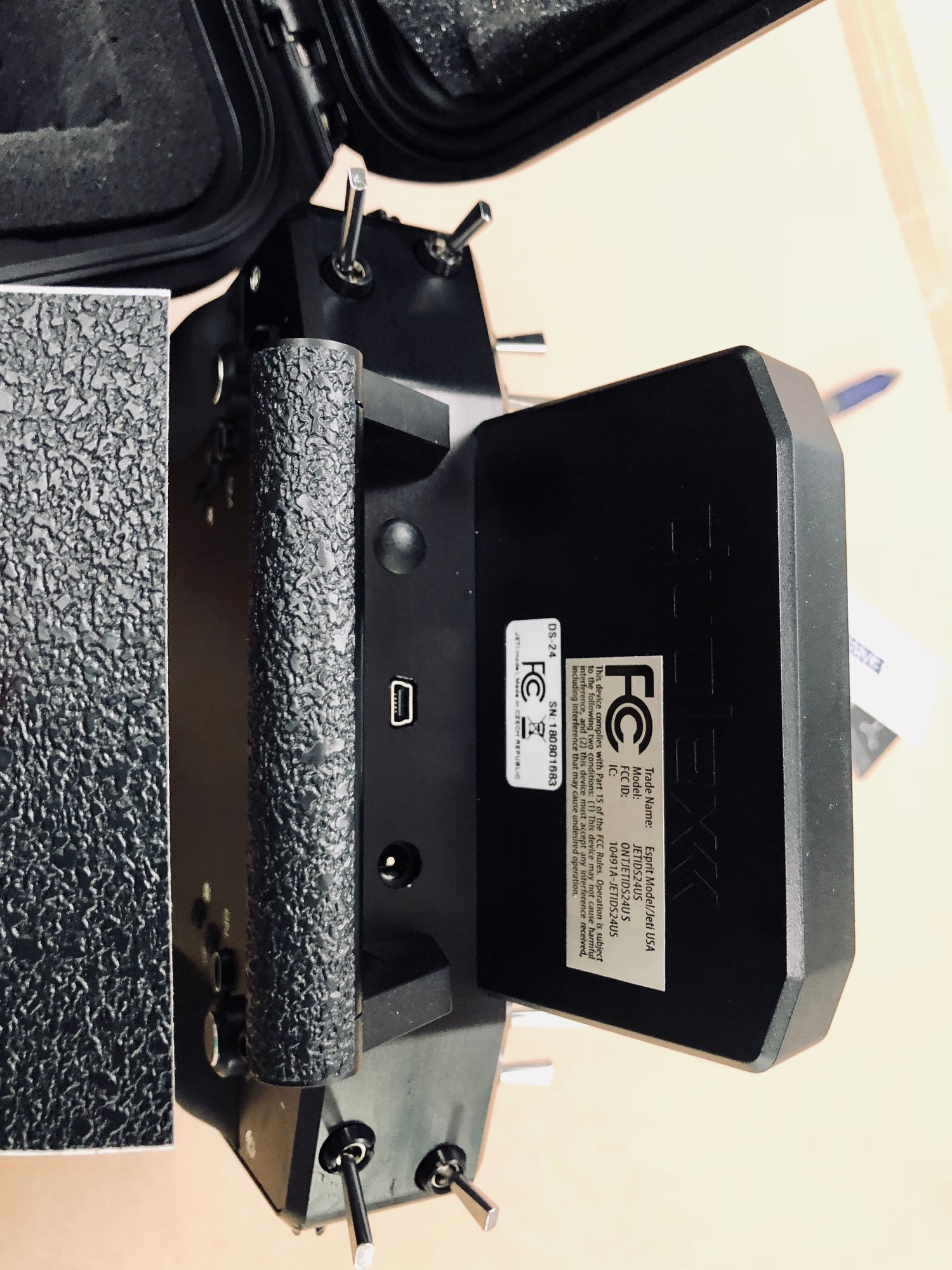
Here is my friends the latest revision of a DS-24 stand idea started by Edgar on post #562. It stands up the TX for easy view and programming on the bench and on ground prior to starting turbine. It folds flush against the back of the case and can easily remain on the Tx when in the case without damage to the foam padding.
The link to the design is posted on Thingverse.com.
https://www.thingiverse.com/thing:2886136


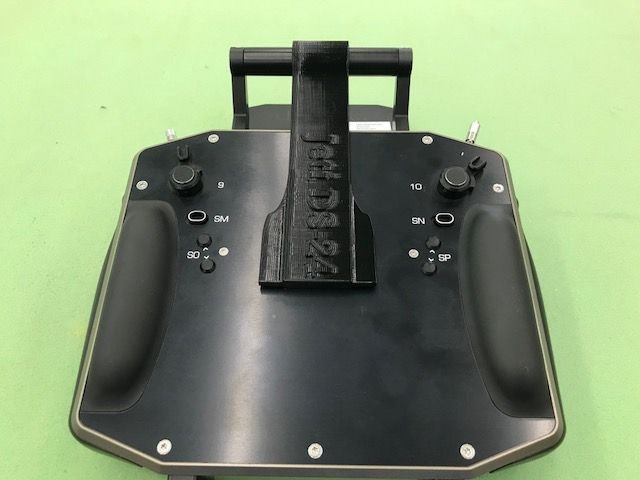
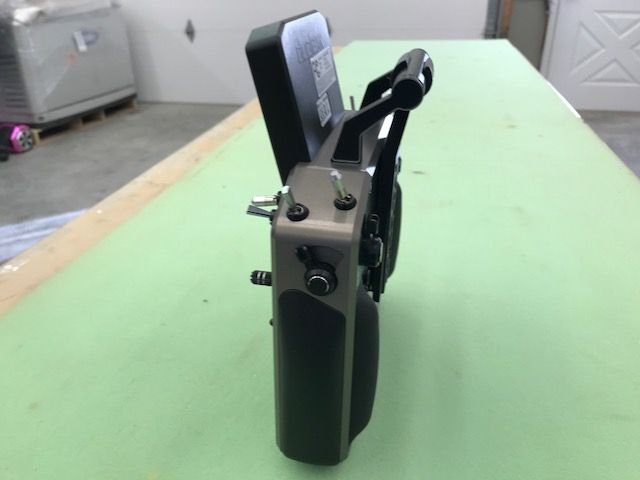
The link to the design is posted on Thingverse.com.
https://www.thingiverse.com/thing:2886136
05-01-2018 | 04:45 PM
#796
Dave, thanks for the stick drawing. It really helped.
As mentioned you above what would be the pros and cons of the R900 into CortexPro port A, the Rex 12 in CortexPro port B with Cortex Pro port 5 into the CB200 RX2 and CortexPro port 6 into CB200 RX1? That seems like a very direct and simple way to hook up the primary and backup receivers.
Thanks, Gary
As mentioned you above what would be the pros and cons of the R900 into CortexPro port A, the Rex 12 in CortexPro port B with Cortex Pro port 5 into the CB200 RX2 and CortexPro port 6 into CB200 RX1? That seems like a very direct and simple way to hook up the primary and backup receivers.
Thanks, Gary
05-02-2018 | 07:18 AM
#799
I need to make some sort of rubber padding for the bottom of the radio as it gets scratched up with these stands, which I think are VERY useful. Especially after my first REAL use with the radio yesterday.
Thanks for everyone's help with the radio. It performed flawlessly and I felt very connected to my jet!
Thanks for everyone's help with the radio. It performed flawlessly and I felt very connected to my jet!