


Jeti DS-24
 04-28-2018 | 10:28 AM
#751

My Feedback: (3)

i just received my first CB200 with the magnetic switch and i was wondering if anyone can tell how you mounted yours? it looks like you can pop the top portion / cover off and mount the switch portion under or behind either a board or on the backside of the fuse,drill the two holes out and mount the cover on the top side of a board or on the outside of the fuse. or does it not come apart ? thank WB_1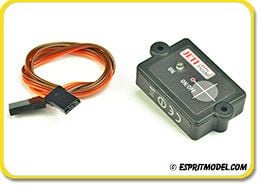


 then I take a spare R3 and program it to be a switch....I control, all my CB200/400 with the R3
 Yup, if I was going to use a switch at all, it would be an R3
04-28-2018 | 07:35 PM
Yup, if I was going to use a switch at all, it would be an R3
04-28-2018 | 07:35 PM
#759

Range check is a control check, the Q doesn't matter. On a new jet what I do is:
Get someone to monitor the GSU, plane not running.. turn it on, select idle but dont start it.. then put it in range mode and walk.. at some point the turbine will transition to whatever you have set in failsafe, usually off or shutoff, or FS.. something other than idle.. get your partner to holler at you ... then see if you have control.. Usually thats a LONG way.. then walk back and see where control is had.. If you have control outside of 100 feet or so, you are good.
Then start the motor and go about to that 100 ft point again, and make sure the motor doesn't shut down..then wiggle the controls
Thats a little different than others, but it serves me well
Get someone to monitor the GSU, plane not running.. turn it on, select idle but dont start it.. then put it in range mode and walk.. at some point the turbine will transition to whatever you have set in failsafe, usually off or shutoff, or FS.. something other than idle.. get your partner to holler at you ... then see if you have control.. Usually thats a LONG way.. then walk back and see where control is had.. If you have control outside of 100 feet or so, you are good.
Then start the motor and go about to that 100 ft point again, and make sure the motor doesn't shut down..then wiggle the controls
Thats a little different than others, but it serves me well
Last edited by gooseF22; 04-28-2018 at 07:38 PM.
04-29-2018 | 01:04 AM
#760

I turn on the turbine and set it at idle... then I walk away 40 long paces ( 40 yards) then with range test active I look at the A1 and A2 numbers.. usually no lower than 6 for me (at my field known as the “jungle”). I have someone rotate the jet on ground at 90 degree and check the numbers.. so ultimately a 360 rotation check. Then I walk to the jet and terminate all transmission (wireless and trainer menu)... within 3 sec (1.5s @reciever or CB +1.5s@ECU) the turbine should shut down.
David
David
04-29-2018 | 06:28 AM
#761
Sounds similar as I’ve done countless times before with other radio systems.
Its just a curiosity as I’d like to know how to correlate A’s and Q’s with loss of control at the range check.
And it looks like I’m about to find out! Thanks guys!
Its just a curiosity as I’d like to know how to correlate A’s and Q’s with loss of control at the range check.
And it looks like I’m about to find out! Thanks guys!

 04-29-2018 | 03:22 PM
#766
with the Range check, you are looking at Q actually, because of the reduce power, and the radio ping pongs with the receiver, so at some range you will see the Q starting to drop.. iF it drops below say 20% or so at 100 ft, then you might have an issue.. Q is calculated from the round trip
04-29-2018 | 03:39 PM
#768
may i ask what the Q and A means. i have the 24 . i just got it but haven't dove into it yet . "i'm try to focus my attention on completing my jet before i get into the programming"
04-29-2018 | 06:57 PM
#770
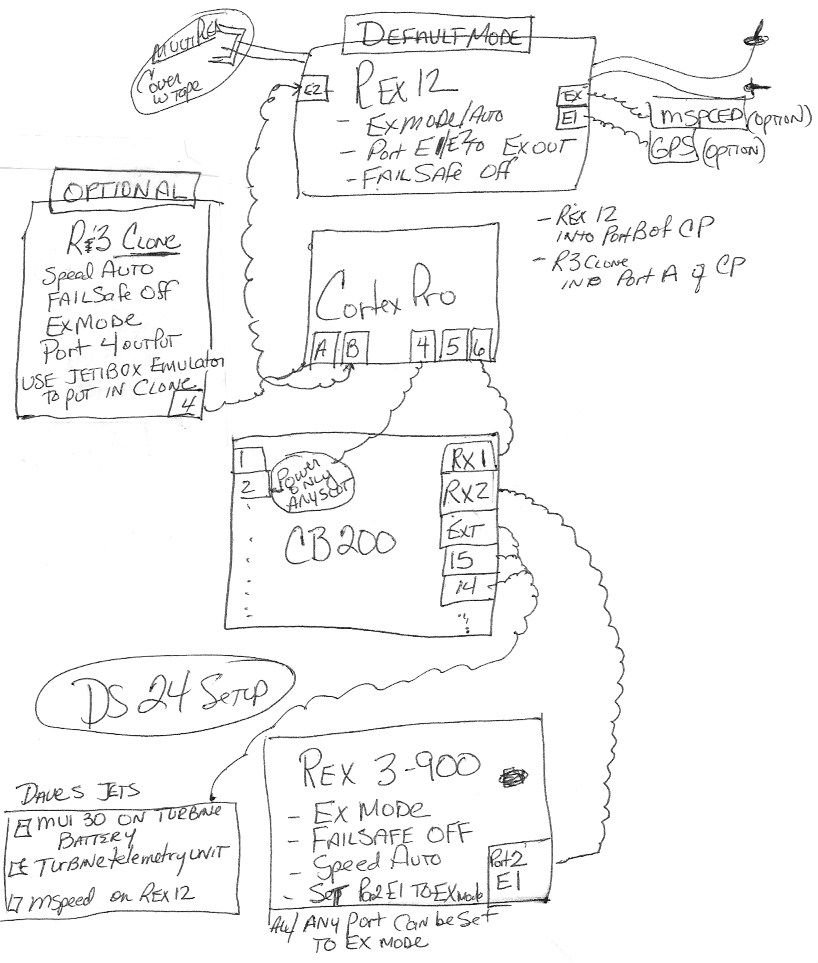
Here you go Ya'll. here is stick diagram that describes a way, not the only way, but one idea on how to hook up a Default/Clone, Cortex Pro, and CB200 setup.. typical of Jeti on a Jet..
This is my preference, however I could easily do away with the R3 here.. I could also be talked into putting the 900 into the Cortex Pro.. there are pros and cons for both.. If you are going to run 2 x 2.4's however Danny and I still recommend first flight or two at a quiet field and in Dual path to help with antenna placements, then switch it to Default clone..
If you need help doing that, Please read back.. there are instructions in the DS16 thread on how to do that.. IT takes some practice to get it.. I have one jet still in Dual path because.... guess.... IT WORKS.. I have another in Default.. IT works too.. I have one plane with an R14 as a the driver, and an R5i as a backup in PPM.. it works.. I have a Rex9, with a R5 backup in PPM, and it doubles as channel 10 for gain.. we have one plane that uses 2 serial inputs to the Cortex Pro, and now it can use that and drive 6 servos directly.. so we end up with 2 receivers and a CP and a DS10 wireless power switch and one of the receivers driving throttle..etc.. Lots of ways to do this.
If you get out there and use a mode you dont understand, you will have a hard time troubleshooting it if there is a setup issue.. Usually the most simple is the best.. In that case, it would be a Primary receiver in Default, and a 900 if you have a 24.. and if you have a DS16, then a default and a clone.
Point is, there is alot of combinations.. so educate yourself on how it works, and choose your path depending on your comfort and conditions...
I heard a good argument today for putting the 900 in the cortex pro port A, and the Rex 12 in B.. CP port 5 in the CB200 RX2 port.. it works too..
They all work.. Its difficult to prove which one works better..
My last point is check your connections.. I opened up a plane yesterday and found a power wire disconnected from the receiver.. it had redundant wiring.. thankfully.. who knows how long it was like that.
good luck out there.
This is my preference, however I could easily do away with the R3 here.. I could also be talked into putting the 900 into the Cortex Pro.. there are pros and cons for both.. If you are going to run 2 x 2.4's however Danny and I still recommend first flight or two at a quiet field and in Dual path to help with antenna placements, then switch it to Default clone..
If you need help doing that, Please read back.. there are instructions in the DS16 thread on how to do that.. IT takes some practice to get it.. I have one jet still in Dual path because.... guess.... IT WORKS.. I have another in Default.. IT works too.. I have one plane with an R14 as a the driver, and an R5i as a backup in PPM.. it works.. I have a Rex9, with a R5 backup in PPM, and it doubles as channel 10 for gain.. we have one plane that uses 2 serial inputs to the Cortex Pro, and now it can use that and drive 6 servos directly.. so we end up with 2 receivers and a CP and a DS10 wireless power switch and one of the receivers driving throttle..etc.. Lots of ways to do this.
If you get out there and use a mode you dont understand, you will have a hard time troubleshooting it if there is a setup issue.. Usually the most simple is the best.. In that case, it would be a Primary receiver in Default, and a 900 if you have a 24.. and if you have a DS16, then a default and a clone.
Point is, there is alot of combinations.. so educate yourself on how it works, and choose your path depending on your comfort and conditions...
I heard a good argument today for putting the 900 in the cortex pro port A, and the Rex 12 in B.. CP port 5 in the CB200 RX2 port.. it works too..
They all work.. Its difficult to prove which one works better..
My last point is check your connections.. I opened up a plane yesterday and found a power wire disconnected from the receiver.. it had redundant wiring.. thankfully.. who knows how long it was like that.
good luck out there.
Last edited by gooseF22; 04-29-2018 at 07:25 PM.
04-30-2018 | 08:18 AM
#771


My Feedback: (40)
Here you go Ya'll. here is stick diagram that describes a way, not the only way, but one idea on how to hook up a Default/Clone, Cortex Pro, and CB200 setup.. typical of Jeti on a Jet..
This is my preference, however I could easily do away with the R3 here.. I could also be talked into putting the 900 into the Cortex Pro.. there are pros and cons for both.. If you are going to run 2 x 2.4's however Danny and I still recommend first flight or two at a quiet field and in Dual path to help with antenna placements, then switch it to Default clone..
If you need help doing that, Please read back.. there are instructions in the DS16 thread on how to do that.. IT takes some practice to get it.. I have one jet still in Dual path because.... guess.... IT WORKS.. I have another in Default.. IT works too.. I have one plane with an R14 as a the driver, and an R5i as a backup in PPM.. it works.. I have a Rex9, with a R5 backup in PPM, and it doubles as channel 10 for gain.. we have one plane that uses 2 serial inputs to the Cortex Pro, and now it can use that and drive 6 servos directly.. so we end up with 2 receivers and a CP and a DS10 wireless power switch and one of the receivers driving throttle..etc.. Lots of ways to do this.
If you get out there and use a mode you dont understand, you will have a hard time troubleshooting it if there is a setup issue.. Usually the most simple is the best.. In that case, it would be a Primary receiver in Default, and a 900 if you have a 24.. and if you have a DS16, then a default and a clone.
Point is, there is alot of combinations.. so educate yourself on how it works, and choose your path depending on your comfort and conditions...
I heard a good argument today for putting the 900 in the cortex pro port A, and the Rex 12 in B.. CP port 5 in the CB200 RX2 port.. it works too..
They all work.. Its difficult to prove which one works better..
My last point is check your connections.. I opened up a plane yesterday and found a power wire disconnected from the receiver.. it had redundant wiring.. thankfully.. who knows how long it was like that.
good luck out there.
This is my preference, however I could easily do away with the R3 here.. I could also be talked into putting the 900 into the Cortex Pro.. there are pros and cons for both.. If you are going to run 2 x 2.4's however Danny and I still recommend first flight or two at a quiet field and in Dual path to help with antenna placements, then switch it to Default clone..
If you need help doing that, Please read back.. there are instructions in the DS16 thread on how to do that.. IT takes some practice to get it.. I have one jet still in Dual path because.... guess.... IT WORKS.. I have another in Default.. IT works too.. I have one plane with an R14 as a the driver, and an R5i as a backup in PPM.. it works.. I have a Rex9, with a R5 backup in PPM, and it doubles as channel 10 for gain.. we have one plane that uses 2 serial inputs to the Cortex Pro, and now it can use that and drive 6 servos directly.. so we end up with 2 receivers and a CP and a DS10 wireless power switch and one of the receivers driving throttle..etc.. Lots of ways to do this.
If you get out there and use a mode you dont understand, you will have a hard time troubleshooting it if there is a setup issue.. Usually the most simple is the best.. In that case, it would be a Primary receiver in Default, and a 900 if you have a 24.. and if you have a DS16, then a default and a clone.
Point is, there is alot of combinations.. so educate yourself on how it works, and choose your path depending on your comfort and conditions...
I heard a good argument today for putting the 900 in the cortex pro port A, and the Rex 12 in B.. CP port 5 in the CB200 RX2 port.. it works too..
They all work.. Its difficult to prove which one works better..
My last point is check your connections.. I opened up a plane yesterday and found a power wire disconnected from the receiver.. it had redundant wiring.. thankfully.. who knows how long it was like that.
good luck out there.
As much as I appreciate the information and diagram you provided in this post, please take a step back and try to read it in the context of someone new to Jeti, or worse, considering switching to Jeti. It’s mind boggling, at best. Even many of us who have owned Jeti for a while are just recreational modelers and may program a new jet once a year. It just can’t be this complicated.
Suggestion: Have Jeti decide on a “recommended” setup for the DS-16 and 24 and provide absolutely clear, step-by-step instructions, on how to accomplish. Something similar to the information provided in the Jeti-Shorts videos at Espirit Models. Offer some configuration “options” but with absolutely clear instructions on how to accomplish.
Suggesting that people read back through 3,459 posts on a related thread (DS-16) is not realistic.
I’ll admit, I may be slower than the average modeler but a lot of this programming and setup is simply not intuitive. Who knew that the REX12 does not use EXT to connect to the CB (like other rx’s) or that a JetiBox is required to select Clone mode? These are examples from just an evening of frustration trying to replace an R3 with a REX12.
I hope I’m not coming off just as a “complainer” because I really like my Jeti and plan to upgrade to the DS24 soon. I just wish the setup was more straight forward and less difficult. You are one of the most informative and helpful reps on RCU so maybe you can help with a solution for us simpletons.
Thanks,
Craig
04-30-2018 | 09:01 AM
#772
No worries Craig, Me too, I wish it were simpler, however your knowledge level will increase over time.. It was intimidating at first for me too.. I get it..
The manual is not very clear, and Jeti isn't going to redo it anytime soon. Its just too difficult to comprehend by reading it. so I posted my own setup.
Yes, You will never find a step by step clear instruction in this stuff. there are too many variables in a Jet setup.. I focus on jet setups only.. The simple jet setup is complicated in general. We tried to write down instructions for this default/clone.. Maybe Jim McEwen can post it down the road.. but it takes a basic understanding to do it. And all my setups have Cortex Pro, so thats where my focus is.. sorry not more clear..
I remember trying to wrap my head around what a clone is.. Its a receiver with the telemetry turned off.. Nothing more nothing less. stick the jumper in it, and it forces duplex back on.. So much of what we did was trial and error..
Sadly today I was testing a setup in a hurry and I plugged a battery in backwards to a powered system and fried a servo lead and an R3.. so its still a learning process.. good luck, you will get it. Try to get together with a current user too.
I went through the same thing when I switched to spektrum from futaba years ago. it was new and hard to understand all those receivers and lights and failsafe, and flashing, frame loss, etc....
The manual is not very clear, and Jeti isn't going to redo it anytime soon. Its just too difficult to comprehend by reading it. so I posted my own setup.
Yes, You will never find a step by step clear instruction in this stuff. there are too many variables in a Jet setup.. I focus on jet setups only.. The simple jet setup is complicated in general. We tried to write down instructions for this default/clone.. Maybe Jim McEwen can post it down the road.. but it takes a basic understanding to do it. And all my setups have Cortex Pro, so thats where my focus is.. sorry not more clear..
I remember trying to wrap my head around what a clone is.. Its a receiver with the telemetry turned off.. Nothing more nothing less. stick the jumper in it, and it forces duplex back on.. So much of what we did was trial and error..
Sadly today I was testing a setup in a hurry and I plugged a battery in backwards to a powered system and fried a servo lead and an R3.. so its still a learning process.. good luck, you will get it. Try to get together with a current user too.
I went through the same thing when I switched to spektrum from futaba years ago. it was new and hard to understand all those receivers and lights and failsafe, and flashing, frame loss, etc....
Last edited by gooseF22; 04-30-2018 at 09:04 AM.
04-30-2018 | 09:04 AM
#773
My Feedback: (40)
No worries Craig, Me too, I wish it were simpler, however your knowledge level will increase over time.. It was intimidating at first for me too.. I get it..
The manual is not very clear, and Jeti isn't going to redo it anytime soon. Its just too difficult to comprehend by reading it. so I posted my own setup.
Yes, You will never find a step by step clear instruction in this stuff. there are too many variables in a Jet setup.. I focus on jet setups only.. The simple jet setup is complicated in general. We tried to write down instructions for this default/clone.. Maybe Jim McEwen can post it down the road.. but it takes a basic understanding to do it. And all my setups have Cortex Pro, so thats where my focus is.. sorry not more clear..
I remember trying to wrap my head around what a clone is.. Its a receiver with the telemetry turned off.. Nothing more nothing less. stick the jumper in it, and it forces duplex back on.. So much of what we did was trial and error..
Sadly today I was testing a setup in a hurry and I plugged a battery in backwards to a powered system and fried a servo lead and an R3.. so its still a learning process.. good luck, you will get it. Try to get together with a current user too.
The manual is not very clear, and Jeti isn't going to redo it anytime soon. Its just too difficult to comprehend by reading it. so I posted my own setup.
Yes, You will never find a step by step clear instruction in this stuff. there are too many variables in a Jet setup.. I focus on jet setups only.. The simple jet setup is complicated in general. We tried to write down instructions for this default/clone.. Maybe Jim McEwen can post it down the road.. but it takes a basic understanding to do it. And all my setups have Cortex Pro, so thats where my focus is.. sorry not more clear..
I remember trying to wrap my head around what a clone is.. Its a receiver with the telemetry turned off.. Nothing more nothing less. stick the jumper in it, and it forces duplex back on.. So much of what we did was trial and error..
Sadly today I was testing a setup in a hurry and I plugged a battery in backwards to a powered system and fried a servo lead and an R3.. so its still a learning process.. good luck, you will get it. Try to get together with a current user too.
04-30-2018 | 09:23 AM
#774

My Feedback: (2)
RP
04-30-2018 | 09:32 AM
#775
I have just ordered a DS-24 and have been using a DS-16 for 3 years. I must second Craig's comments. The Jeti is a great radio with incredible capability. The hours spent trying to figure out how to program these set ups would be better spent in the shop. Jeti should pay to have you experts write up an ancillary manual on how to tackle the most complex issues we deal with in our models related to set up and programming.
Roy
Roy

