


Question for the 18MZ Guru
 02-05-2016 | 01:46 PM
#1

Thread Starter
Senior Member
Joined: Dec 2013
Posts: 540
Likes: 0
Received 0 Likes
on
0 Posts
 Question for the 18MZ Guru
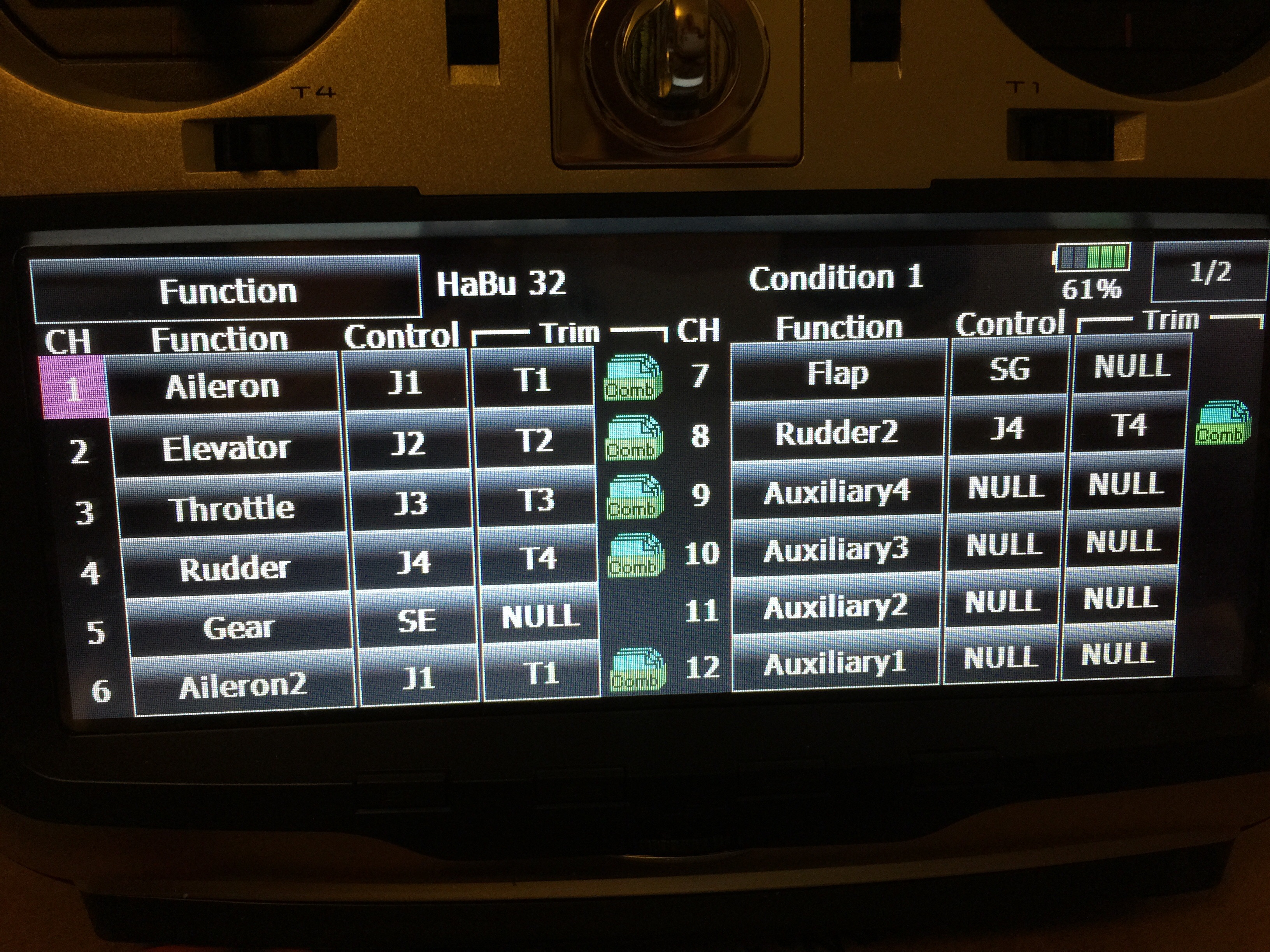
I'm in the process of programming a new Habu 32 into my 18MZ but running into a slight issue. My question is why is the Aileron 2 not in a box like the rest of the control surfaces? I had a similar issue about two years ago when I was attempting to program a flying wing with elevator/aileron configuration. How I remedied that situation is I had to choose a wing type that was actually not correct for my application. That's what is causing me this issue now with my current Habu 32 programming. I've chosen the correct main wing type for my application, which is a separate channel for each aileron servo (#1 & #6) and with one channel for both flaps. The first picture shows the "functions" screen. The second picture shows the D/R screen. I need the aileron 2 to appear with a box around it so I can click and open it to do the servo programming. Anyone have any idea why aileron 2 doesn't have the box around it? Thanks
.
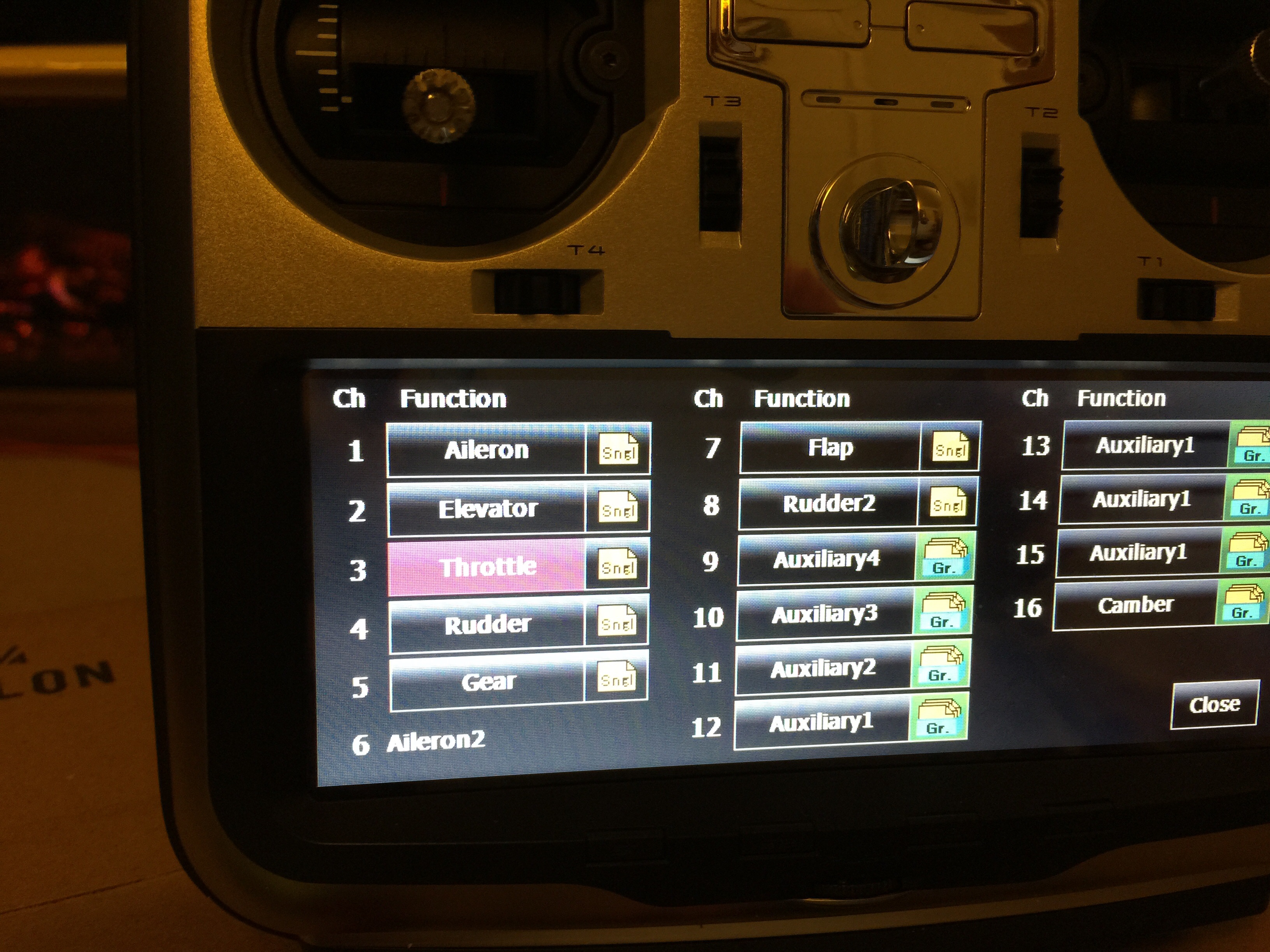
.
 02-05-2016 | 03:38 PM
#2


Sushi,
Because you have selected a dual servo wing type you only make d/r, expo and other programming on the Aileron1 function and these are automatically mapped onto Aileron2 You can still set the end points individually on the ATV screen which will allow access to Aileron2. Similarly differential can be set on the Aileron Differential screen. Hope this helps.
Malcolm
Because you have selected a dual servo wing type you only make d/r, expo and other programming on the Aileron1 function and these are automatically mapped onto Aileron2 You can still set the end points individually on the ATV screen which will allow access to Aileron2. Similarly differential can be set on the Aileron Differential screen. Hope this helps.
Malcolm
02-05-2016 | 04:05 PM
#3

+1
The D/R screen for dual rates and expo is for purposes of 'transmission' and not for pupose of 'servo'. Hence the fact you can only adjust what the transmitter will 'send' on that function. If you had two flaps, or two elevators, the situation will display exactly the same as the aileron is doing now - only the #1 will have the block around it.
Cheers,
Jan
The D/R screen for dual rates and expo is for purposes of 'transmission' and not for pupose of 'servo'. Hence the fact you can only adjust what the transmitter will 'send' on that function. If you had two flaps, or two elevators, the situation will display exactly the same as the aileron is doing now - only the #1 will have the block around it.
Cheers,
Jan
02-08-2016 | 01:30 PM
#4
Thread Starter
Senior Member
Joined: Dec 2013
Posts: 540
Likes: 0
Received 0 Likes
on
0 Posts
Great information. Thanks guys. But how about the way that I have the rudder 1 and rudder 2 setup on the screens. I basically have the rudder in the tail set up on one channel and I have the nose steering in the front set up the "rudder 2" on separate channels. I do this so I can fine tune the steering (tracking) without it effecting the position of the rudder in the tail. Why doesn't this occur with the rudders like it is doing with the ailerons? I'm attempting to try out some "crow" settings. I'll play with it tonight.
02-08-2016 | 01:53 PM
#5
Great information. Thanks guys. But how about the way that I have the rudder 1 and rudder 2 setup on the screens. I basically have the rudder in the tail set up on one channel and I have the nose steering in the front set up the "rudder 2" on separate channels. I do this so I can fine tune the steering (tracking) without it effecting the position of the rudder in the tail. Why doesn't this occur with the rudders like it is doing with the ailerons? I'm attempting to try out some "crow" settings. I'll play with it tonight.
Check out the Airbrake function to set up your crow. It will automatically apply the settings to both aileron servos because you've selected a 2 servo wing.
Malcolm
 02-09-2016 | 08:59 AM
#7
Thread Starter
Senior Member
Joined: Dec 2013
Posts: 540
Likes: 0
Received 0 Likes
on
0 Posts
Thanks again guys. I'll definitely make sure that the servo setting set up on the nose gear is the same when the gear is up. And I'll try the crow setup the way your suggesting it be set up. I do really like that airbrake suggestion as well. I'll try them all and see which one works out best.
02-09-2016 | 10:55 AM
#9
Thread Starter
Senior Member
Joined: Dec 2013
Posts: 540
Likes: 0
Received 0 Likes
on
0 Posts
I'm curious how to establish connection to each specific servo. So far, when I go to set up servo throws and angles, both respond, one positive and one negative (one moves up while the other moves down). I've set up the servo's correctly through the s.bus system. I'll play with it some more later tonight. I do like the airbrake setup idea for crow but also interested to explore the other options as others have suggested.
02-09-2016 | 11:03 AM
#10


My Feedback: (18)
You can do everything you desire with sub trim and ATV for individual servo. Offset in the AFR screen is really good for flap fine tuning. There are several different ways to set up crow… This radio is complex, but very powerful in all the options you have.
02-09-2016 | 12:02 PM
#11
Thread Starter
Senior Member
Joined: Dec 2013
Posts: 540
Likes: 0
Received 0 Likes
on
0 Posts
Thank you for the information. I'll definitely take a good look in the sub trim and ATV screens for what I want to do.


