


Powerbox Core radio and set up thread.

 10-05-2024 | 04:17 PM
#1978


Hi Angus,
Just out of curiosity did you press on the the update for the operating system or the application when you started the update process...?
If you clicked on updating the application, you just need to go back and update the operating system.
The whole update process should work ok just by updating the operating system... no need to click on any other update buttons.
Also - just double check your audio settings in the audio menu in case your volume is down too low and you simply are unable to hear the sounds.


The following 3 users liked this post by BarracudaHockey:
10-18-2024 | 04:19 PM
#1982

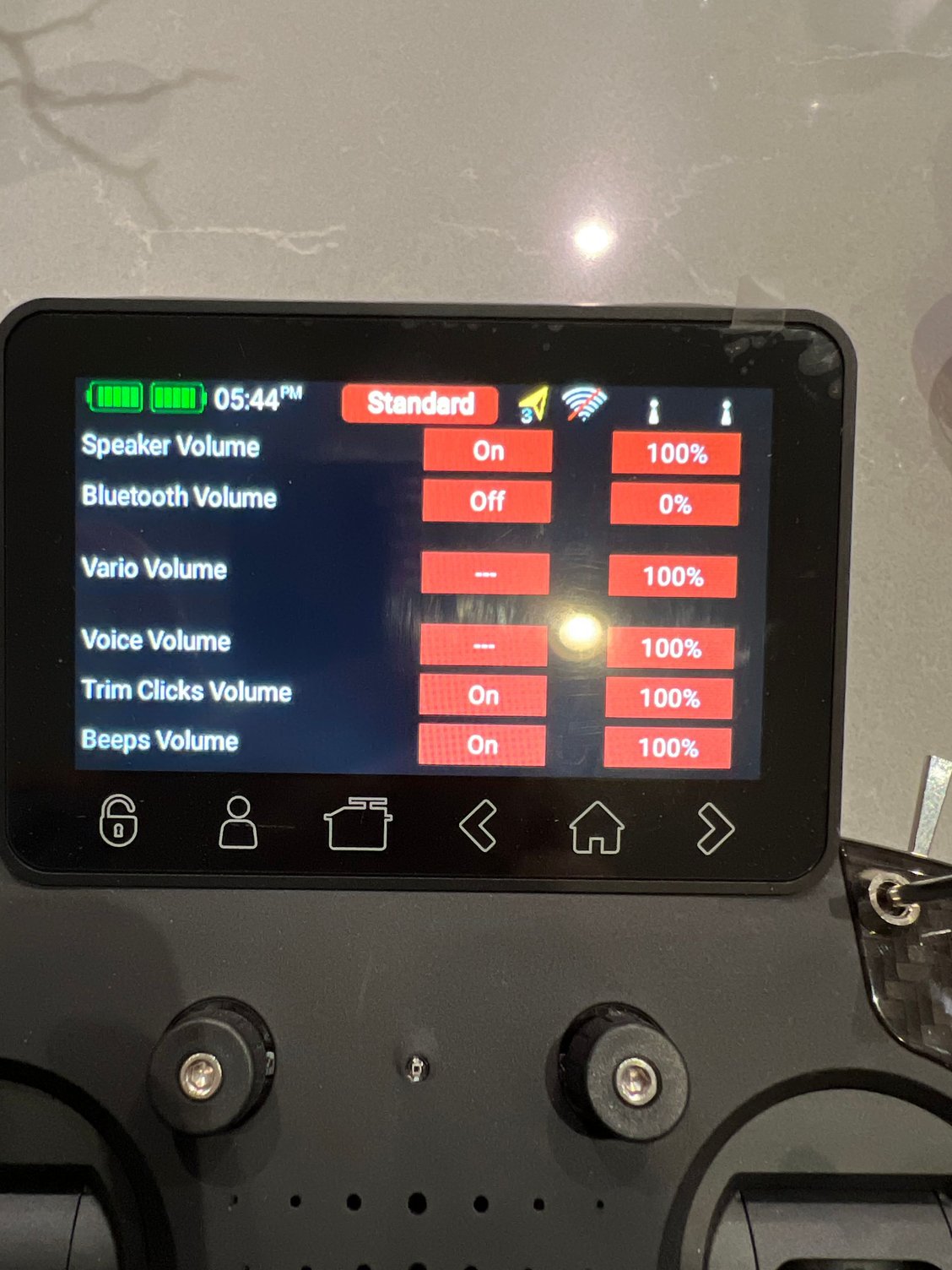
Hi All, I am trying to have the trim to beep when i change the trim but no matter what i do on this model, it does not do it. have you guys experienced this ? Here is my screen. I also have the beep in functions set up.
Behzad
Behzad
Last edited by DUCMOZ; 10-18-2024 at 06:11 PM.
10-18-2024 | 11:05 PM
#1983
You are looking in the wrong spot...
For the Trim, audio/vibe controls are setup within the Trim Menu found in the main Functions screen.
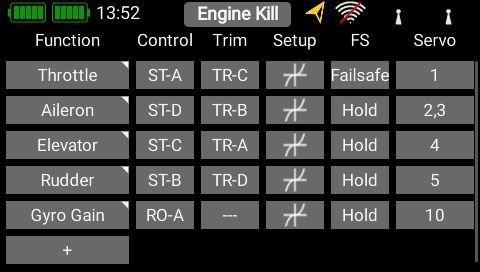
Once in the Trim menu the audio and vibration options can be found here in the 'Signal' type selection box.

If you have set it up correctly as per above... are you getting other sounds through the speaker...?
For the Trim, audio/vibe controls are setup within the Trim Menu found in the main Functions screen.
Once in the Trim menu the audio and vibration options can be found here in the 'Signal' type selection box.
If you have set it up correctly as per above... are you getting other sounds through the speaker...?
Last edited by CostasV; 10-19-2024 at 02:00 AM.
10-19-2024 | 08:23 AM
#1984
Hi Costas, thank you . I am in correct spots and have correct set-up. The only time I receive any feedback is that if I have it on Vibration and Beep. Then when trim in center, I get vibration and still no beep. But don’t get any sound or vibration once I move the trim. Now that you mentioned sounds, I noticed that I am not getting any sounds from the timer although it is set up for beeps. The radio does not have much use on it. Thanks again.
Behzad
Behzad
10-19-2024 | 09:59 AM
#1986
Hi Andy, thank you soooo much. I had not updated the OS. As soon as I updated it, it worked. I have the Transceiver 1.46 and Stickcontroler at 1.5. Are these correct?
thanks again.
Behzad
thanks again.
Behzad
10-19-2024 | 10:26 AM
#1987


My Feedback: (11)
You don't fool with those, they are automatic. Application and OS are the only ones that you should fool with (and the receivers of course)
Now that you're up to date go into the receiver update menu like you're going to update a receiver and use the new button to download the latest firmware available for all the receivers.
And you're welcome.
Now that you're up to date go into the receiver update menu like you're going to update a receiver and use the new button to download the latest firmware available for all the receivers.
And you're welcome.
10-19-2024 | 10:29 AM
#1988


My Feedback: (99)
You don't fool with those, they are automatic. Application and OS are the only ones that you should fool with (and the receivers of course)
Now that you're up to date go into the receiver update menu like you're going to update a receiver and use the new button to download the latest firmware available for all the receivers.
And you're welcome.
Now that you're up to date go into the receiver update menu like you're going to update a receiver and use the new button to download the latest firmware available for all the receivers.
And you're welcome.
10-19-2024 | 01:45 PM
#1990
Nevertheless there has been no update to the firmware of the 26XS receivers as yet so no need to update it at this point in time.
The following users liked this post:
AEROSHELDON (10-19-2024)
10-21-2024 | 07:11 PM
#1992

Hi all,
It has been a long time since I've had to download a new photo of a new model. In the meantime I've changed computers and now I can't remember the program I used to resize the photo so that it can be transfered to my Core via USB.
Please can you enlighten me?
Regards,
JanR
It has been a long time since I've had to download a new photo of a new model. In the meantime I've changed computers and now I can't remember the program I used to resize the photo so that it can be transfered to my Core via USB.
Please can you enlighten me?
Regards,
JanR
10-22-2024 | 11:24 AM
#1993
Hi Jan... I was just using Paint 3D in Windows but MS are dropping this app at the end of October from memory.
I also use a more complex photo editing program (which is free) called GIMP.
Just remember that you need to scale the image to the following dimensions 215 x 100 pixels and save it as a JPG file ie. the image file must have an extension of .jpg (not .jpeg or anything else).
it is important to save it in the root directory of your USB stick (otherwise the Tx will not locate the file) and then just import the image over using the Image button in the model selection menu.
I also use a more complex photo editing program (which is free) called GIMP.
Just remember that you need to scale the image to the following dimensions 215 x 100 pixels and save it as a JPG file ie. the image file must have an extension of .jpg (not .jpeg or anything else).
it is important to save it in the root directory of your USB stick (otherwise the Tx will not locate the file) and then just import the image over using the Image button in the model selection menu.
The following 2 users liked this post by CostasV:
Jannica (10-22-2024),
Springbok Flyer (10-22-2024)
The following users liked this post:
Springbok Flyer (10-22-2024)
11-06-2024 | 07:14 PM
#1995
Joined: Nov 2005
Posts: 12
Likes: 0
Received 0 Likes
on
0 Posts
From: Vacaville ,
CA
I tried updating my Core today and now it doesn’t have all the sounds or shortcuts anymore. I have no System icon to access any of the wifi, software or other info that was there before.
Has anyone seen this or know how to fix it? It’s like it only did part of the update.
Thanks!
Has anyone seen this or know how to fix it? It’s like it only did part of the update.
Thanks!
Last edited by p51dplt; 11-06-2024 at 07:17 PM.
11-06-2024 | 07:33 PM
#1997
Joined: Nov 2005
Posts: 12
Likes: 0
Received 0 Likes
on
0 Posts
From: Vacaville ,
CA
 11-08-2024 | 07:23 AM
#2000

My Feedback: (9)
PBR-26D firmware update failure ?
One of my many PBR-26D's fails update. Currently running 4.1, but unlike my other 26D's will not switch to update mode via CORE update. When I try Mobile Terminal update, MT properly detects v4.1 and does not show v4.2 available for this receiver. All other 26D's successfully updated to v4.2 via CORE or MT. This 26D is NOT in the recalled batch.
Always a bit concerned to fly an Rx that isn't playing nice
Any tips???
Always a bit concerned to fly an Rx that isn't playing nice
Any tips???

